How Head Start Teachers Can Save Time Without Sacrificing Quality

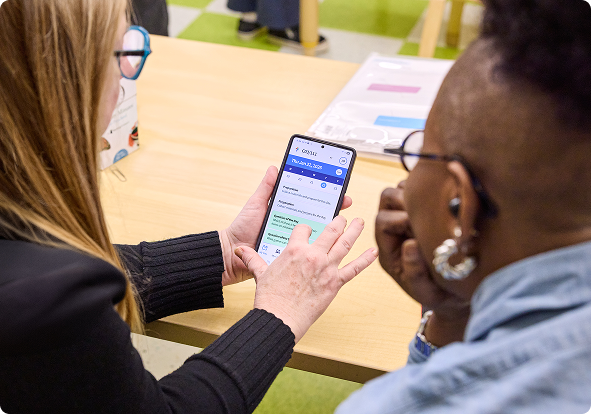
Head Start teachers balance a wide range of responsibilities each day, from lesson planning, child assessment, and documentation to family communication, compliance requirements, and ongoing professional learning. With so many competing priorities, finding enough time to manage everything efficiently can feel like a constant challenge. Even saving just a few minutes on routine tasks can make a meaningful difference over time. Fortunately, saving time doesn’t always require major changes. Often, small adjustments, including making better use of technology, can simplify everyday tasks. The goal isn’t to add more platforms or create new work. Instead, it’s about using the tools you already have to make everyday tasks easier to manage so you can spend more time where it matters most: supporting children’s learning.
Time-Saving Strategy #1: Capture Documentation in the Moment
Documenting children’s learning is essential, but finding time to capture observations during a busy day can be challenging. Technology can help by making it easier to capture a quick note, photo, video, or voice recording while learning is happening, so important details aren’t forgotten later.
For example, during choice time, you might use a tablet or smartphone to photograph a child building a complex structure and add a short note about the problem-solving skills you observed. That observation is documented right away instead of becoming another task to complete later.
Capturing documentation in the moment not only saves time but also helps make your observations more accurate and useful when it’s time to plan for children’s learning.
Time-Saving Strategy #2: Use Digital Assessment Tools to Make Assessment Part of Daily Teaching
Assessment doesn’t have to feel like another task added to an already busy day. The best opportunities to assess children’s learning happen during the everyday experiences that are already part of your classroom routine.
Digital assessment tools can make those observations easier to organize and document. Many tools help teachers quickly record children’s skills and connect observations to learning objectives. For example, GOLD includes built-in digital forms for skills such as alphabet knowledge, number recognition, and shapes, making it easy to document what children know without creating additional paperwork.
During a small-group activity, you might use a digital assessment tool to document a child’s ability to sort objects by shape, recognize letters, or count with one-to-one correspondence. The observation is immediately added to the child’s assessment record, reducing duplicate documentation later. Using digital assessment tools to organize observations and documentation can save time, reduce duplicate work, and make assessment easier to manage.
It’s so easy for teachers to collect documentation now. We used to have sticky notes and binders. Now we can use the app, take a picture, and it’s there.”
– Charlotte Richards, Murray Head Start
Time-Saving Strategy #3: Use Technology to Strengthen Family Partnerships
Strong family partnerships begin with clear, consistent communication. Technology can support the communication you’re already doing, making it easier to share information, stay connected, and build relationships with families.
The goal isn’t to increase the number of messages families receive. It’s to communicate in ways that are intentional, accessible, and responsive to each family’s preferences. Technology should support family partnerships by creating multiple ways for families to engage in their children’s learning.
Consider how you already communicate with families and whether technology could make those routines easier. Digital tools can help you share classroom updates, photos, reminders, and learning highlights. They can also make it easier to gather information through surveys, check-ins, and event sign-ups. Text messages, emails, phone calls, video conferencing, and translation tools can help you communicate in ways that are accessible and culturally and linguistically responsive for all families.
Technology can also support programs in extending learning beyond the classroom, with programs such as ReadyRosie. ReadyRosie’s “Modeled Moment” videos provide families with activities they can do at home, strengthening home-school partnerships and supporting the growth and development of the children in your program.
Consistent communication supported by technology helps teachers stay organized, share information more efficiently, and create more opportunities for meaningful family engagement.
Time-Saving Strategy #4: Build Sustainable Routines
Many classroom responsibilities recur daily or weekly, making them ideal for benefiting from routines supported by technology. Rather than reinventing your process each time, look for ways to simplify recurring tasks using tools you already have.
Features such as voice-to-text transcription, email templates, calendar reminders, and document shortcuts can reduce the time spent on routine administrative work.
For example, you might schedule 20 minutes at the end of each day to respond to family emails. Using folders, labels, or automatic sorting rules can help you quickly identify messages that need immediate attention while keeping less urgent items organized.
As you build routines, ask yourself these questions.
- Does this save me time?
- Is it easy to repeat?
- Does it fit naturally into my daily workflow?
Sustainable routines don’t have to be complicated. Small improvements that are repeated consistently often have the biggest impact.
Time-Saving Strategy #5: Use Planning Tools that Work Together
Planning is more efficient when lesson planning, curriculum, assessment, documentation, and family engagement are connected. When these systems work together, teachers spend less time locating and moving information between platforms and more time focusing on instruction.
Integrated planning tools allow teachers to move seamlessly from lesson planning to implementation to documentation without duplicating work. For example, within SmartTeach, teachers can open an Intentional Teaching Experience directly from a lesson plan, review the teaching guidance, record observations, and assign preliminary assessment levels, all within the same workflow.
When planning tools are connected, teachers spend less time managing information and more time using it to support children’s learning.
Thoughtful use of technology can help simplify the administrative work that often competes for your time and attention, giving you more time to focus on the relationships, creativity, and intentional teaching that define high-quality early childhood education.
Whether you’re using digital tools to capture documentation in the moment, complete assessments, strengthen family partnerships, or build sustainable routines, each small change can make your work more manageable. Don’t try to transform everything at once; start by choosing one strategy that fits your classroom and build from there.
When technology supports the work you’re already doing, it creates more opportunities to focus on what matters most: building meaningful relationships, supporting children’s learning and development, and creating engaging experiences that help every child thrive.
About the Author
Tina Sykes is a Senior Research Manager at Teaching Strategies with extensive expertise in early childhood education and research. She brings a wealth of experience developing and facilitating interactive professional learning opportunities, coaching and mentoring early childhood professionals, teaching in higher education, and leading focus groups. In her current role, she applies her research skills to inform and promote best practices in early childhood education. Holding dual M.Ed. degrees in Adult Education and Curriculum Development and Early Childhood Education, Tina is dedicated to advancing the early childhood education field through research-driven insights and professional development.
Fun Fact: Tina is a proud Head Start alumna and now finds joy in playing alongside and observing her three-year-old grandson as he explores the world with curiosity and wonder.

Support Your Head Start Team with Connected Technology
Discover how our Head Start solution helps educators simplify daily workflows, strengthen family partnerships, and focus more time on meaningful interactions with children.
Related Resources


Frequently Asked Questions
Using connected technology can simplify many of the tasks associated with Head Start compliance, from documentation and assessment to family communication. When information is captured once and shared across connected tools, teachers spend less time on paperwork and more time supporting children’s learning.
Many educators use integrated tools that combine curriculum, assessment, documentation, and family communication in one place. Solutions like SmartTeach, GOLD, GoldFfinch, and ReadyRosie help reduce duplicate work by supporting multiple classroom tasks within a connected ecosystem.
Tadpoles helps teachers manage daily operations such as attendance, family communication, and activity reports, while GOLD supports ongoing observational assessment and documentation of children’s development. When used together as part of the Teaching Strategies ecosystem, they reduce duplicate data entry and create a more streamlined workflow for teachers.
Integrated tools allow information to flow between lesson planning, assessment, documentation, and family communication, reducing the need to enter the same information multiple times. This helps teachers stay organized, work more efficiently, and spend more time interacting with children.
Connected technology streamlines routine administrative tasks by bringing planning, documentation, assessment, and family communication together in one workflow. When teachers spend less time managing paperwork, they have more opportunities for meaningful interactions that support children’s learning and development.